
Last updated: January 13, 2026
My sister posted a perfectly-captioned screenshot of her Gmail to her story:

Thanks for letting me use your screenshot, sis!
The "suggested reply" feature exists because Google's technology has read and statistically modeled billions of email messages like the emails you send. Gmail knows how people are likely to respond to any message in your inbox, and they show you those results. Cool feature! I hate it.
This blog post outlines the most recent impact of GenAI on the way I host my website, including scripts you can copy to achieve the same goals I had.

I use Umami to analyze traffic to my website. Starting in mid-2025, I noticed website visits from IP addresses geolocated to Singapore and China. These visits had some strange properties...
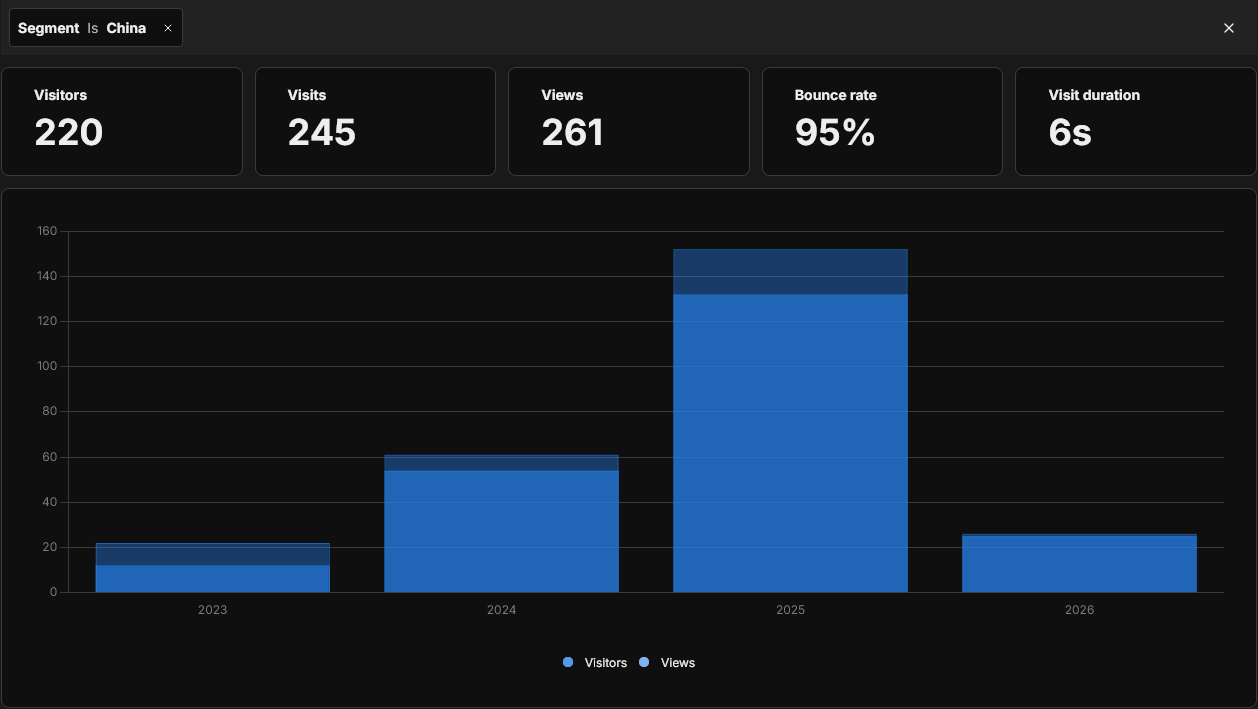
Since I started using Umami in 2023, I've received 220 visitors from China, peaking in 2025, with lots of activity already in 2026:
There are two reasons these strange visits stuck out to me:
- The clients were visiting pages that haven't been live on my site for years, such as /buy/shibazakura-festival-below-mt-fuji/. Some of the clients visiting these sites must be crawling from a very old sitemap.
- These clients were consistently not taking any actions on the page that triggered custom event analytics, such as clicking on individual images in a gallery.
This behavior leads me to believe that some servers located in Singapore and China are visiting my website, page by page, and scraping its data for use in large language models. I do not like this. I don't want my photos being used in image generation datasets, and I don't want my writing to be used in written-language datasets. I can't rely on writing rules in a robots.txt file to stop crawlers.
So, like wielding a large hammer, I decided to block all traffic from China and Singapore from connecting to my website.
Let's analyze these website visits some more, and then I'll share how I'm blocking these visits by country.
Here's an example of an event stream from someone I believe to be a legitimate visitor to my site:
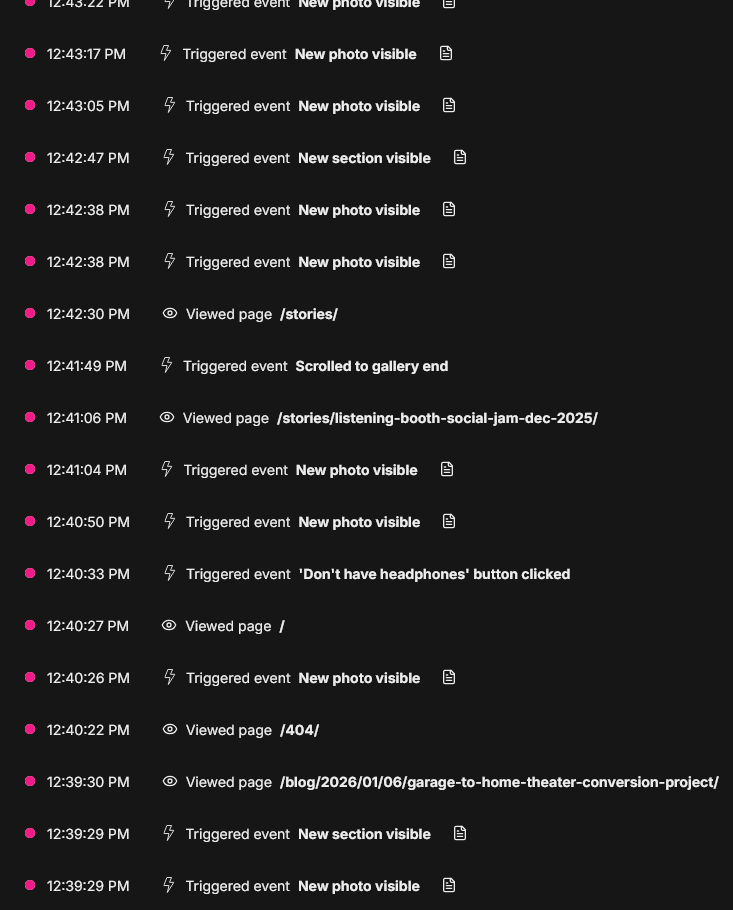
Starting from the bottom of the event stream and moving up in time, notice how this viewer is navigating between pages, clicking on buttons and photos, and scrolling around the page, all with reasonable amounts of time between events. Thank you, Real Human Visitor! I hope you had a lovely time exploring.
Here's what a visit from a bot looks like:
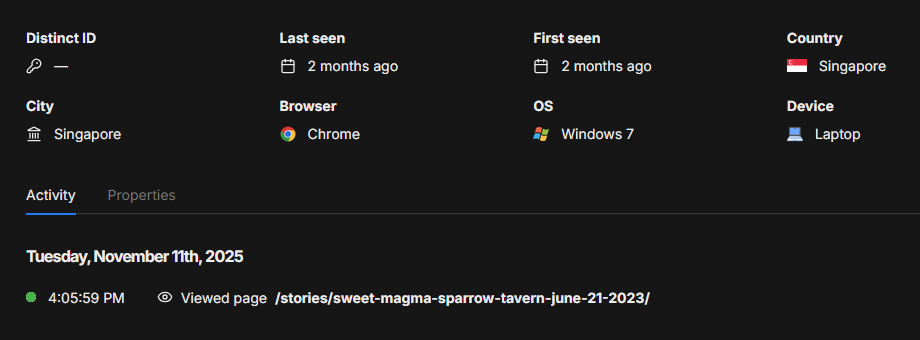
Some red flags:
- Only one page visited - an esoteric story
- No page events - the client didn't click on any image or scroll to the bottom of the gallery
- No referrer information, so it was either blocked or the client went straight to this page
- Using an old OS, Windows 7
- Using Chrome on a "laptop", which is likely a headless version of Chrome
A month ago, I decided to drop all connection requests from Singapore. Today, I modified my connection rules to drop all connection requests from China.
With an irony that is not lost on me, I worked with Claude to help me build a regularly-scheduled systemd Ubuntu service that runs on my Web server. This service compiles a list of known IP addresses from Singapore and China grabbed from Ripe.net, then imports them into ipset with a rule to drop connection requests from those IP addresses.
Understand what you are pasting before copying code from a website on the Internet.
Here's the bash script. You can copy this code into a .sh file anywhere on your filesystem, like /usr/local/sbin/ipdeny.sh:
ipdeny.sh
#!/bin/bash

# Fast multi-country IP blocking using ipset
# ipset is much faster than individual UFW rules

LOG_FILE="/var/log/block-countries-ips.log"
TEMP_DIR="/tmp/country-blocks"

# Countries to block (add more as needed)
declare -A COUNTRIES=(
    ["singapore"]="SG"
    ["china"]="CN"
)

log_message() {
    echo "[$(date '+%Y-%m-%d %H:%M:%S')] $1" | tee -a "$LOG_FILE"
}

# Create temp directory
mkdir -p "$TEMP_DIR"

log_message "Starting multi-country IP block update"

# Function to download and process IPs for a country
process_country() {
    local country_name=$1
    local country_code=$2
    local ipset_name=$country_name
    local temp_file="$TEMP_DIR/${country_code}-ips.txt"
    local data_file="$TEMP_DIR/${country_code}-data.json"

    log_message "Processing $country_name ($country_code)..."

    # Download country IP ranges from RIPE
    curl -s "https://stat.ripe.net/data/country-resource-list/data.json?resource=${country_code}" -o "$data_file"

    if [ $? -ne 0 ]; then
        log_message "ERROR: Failed to download IP data for $country_name"
        return 1
    fi

    # Extract IPv4 ranges
    jq -r '.data.resources.ipv4[]' "$data_file" > "$temp_file"

    if [ ! -s "$temp_file" ]; then
        log_message "ERROR: No IP ranges found for $country_name"
        return 1
    fi

    COUNT=$(wc -l < "$temp_file")
    log_message "Downloaded $COUNT IP ranges for $country_name"

    # Create new ipset (or recreate if exists)
    ipset list "$ipset_name" >/dev/null 2>&1
    if [ $? -eq 0 ]; then
        # Set exists, create temporary set and swap
        log_message "Updating existing ipset for $country_name"
        ipset create "${ipset_name}_temp" hash:net

        while IFS= read -r ip_range; do
            ipset add "${ipset_name}_temp" "$ip_range" 2>/dev/null
        done < "$temp_file"

        # Swap the sets atomically
        ipset swap "${ipset_name}_temp" "$ipset_name"
        ipset destroy "${ipset_name}_temp"
    else
        # Set doesn't exist, create it
        log_message "Creating new ipset for $country_name"
        ipset create "$ipset_name" hash:net

        while IFS= read -r ip_range; do
            ipset add "$ipset_name" "$ip_range" 2>/dev/null
        done < "$temp_file"

        # Add iptables rule to block the set
        iptables -I INPUT -m set --match-set "$ipset_name" src -j DROP -m comment --comment "Block $country_name"
    fi

    log_message "ipset updated with $COUNT ranges for $country_name"

    return 0
}

# Process each country
for country_name in "${!COUNTRIES[@]}"; do
    country_code="${COUNTRIES[$country_name]}"
    process_country "$country_name" "$country_code"
done

# Cleanup
rm -rf "$TEMP_DIR"

log_message "Multi-country IP block update completed"

# Display summary
log_message "=== BLOCKING SUMMARY ==="
for country_name in "${!COUNTRIES[@]}"; do
    if ipset list "$country_name" >/dev/null 2>&1; then
        entry_count=$(ipset list "$country_name" | grep -c "^[0-9]")
        log_message "$country_name: $entry_count IP ranges blocked"
    fi
doneMake your new script executable with:
chmod +x /usr/local/sbin/ipdeny.shNext, create a new systemd service with sudo nano /etc/systemd/system/ipdeny.service:
ipdeny.service
[Unit]
Description=Block Singapore && China IP addresses using ipset
After=network-online.target
Wants=network-online.target

[Service]
Type=oneshot
ExecStart=/usr/local/sbin/ipdeny.sh
ExecStartPost=/usr/sbin/netfilter-persistent save
User=root
You'll probably want to have this service run on a regular basis, such as nightly. To do this, create a new systemd timer with sudo nano /etc/systemd/system/ipdeny.timer:
ipdeny.timer
[Unit]
Description=Update IP block list daily

[Timer]
# Run daily at a specific time (e.g., 3:00 AM)
OnCalendar=*-*-* 03:00:00

# Ensure it runs once after boot if the scheduled time was missed
Persistent=true

[Install]
WantedBy=timers.target
Finally, run these commands to enable your service's timer so that your IP blocklist updates every morning at 3AM:
sudo systemctl daemon-reload
sudo systemctl enable ipdeny.timer
sudo systemctl start ipdeny.timer
sudo systemctl list-timers
Rather than wait for the timer to expire to run your service, you can run it manually with:
sudo systemctl start ipdeny.serviceYou can check the service logs with:
sudo journalctl -u ipdenyI'm making a lot of unfortunate assumptions by blocking all traffic to my website from China and Singapore. I know that not all vistors from those countries are bots scraping my photos, and some folks legitimately want to see what I produce. There are definitely server farms in the US that are performing the same task of vacuuming up all of the Internet's content for profit.
I just don't know what else to do. I'm exhausted.
Generative AI tools are fascinating and can be quite useful, but I can't forget the human costs. Our creative work is being monetized without our consent. The machine is sucking up all the boring emails, the photos of our children, and the fanfic. We deserve agency. We deserve to know where our data is being used.
Do you have a better way to prevent bots from scraping my website specifically for usage in LLM training data? Do you know of a way to programmatically poison the photos I upload to my site? Contact me.

Support me on Patreon for $3 to download exclusive full-resolution photographs and get notified when I publish work like this.
Thank you for your support!